Showing posts with label 12 channel remote. Show all posts

January 23, 2020

Another mini project 1.8 - 'Trading Card Dispenser'

So after a bit more fine tuning,
the TCD is now complete.


The TCD..... The 'Trading Card Dispenser'

I was still waiting for an electronic component to arrive in order to wire everything up to test it. It arrived and it wasn't what I was hoping for, so I'll have to revert back to my original electronics setup, not a big deal as this doesn't effect the actual dispenser being assembled or operated.

I've designed this as a self contained unit with it's own remote controller & timer delay off circuit, but it would also be able to be controlled via any momentary switch, Arduino etc. I'm not an Arduino guy, but from what I know this is possible.
The motor runs on 6v and would only need to run for a few seconds.

The unit comes in 4 parts, base (in red), plate (in blue), lid (in green) & a wheel adapter which fits onto the motor. (colour's are for identification only, not actual)

There are then 4 components required to be bought in order to fit and glue together to fully assemble. I'll post up this list and an assembly instruction PDF when files are released.

More updates soon.......

November 27, 2019

Sounds for Droids - 2019 upgrade 1.0

How to build a sound module that can be triggered by a remote control transmitter.

The 12 channel remotes for controlling my R5’s sounds have, to my knowledge, never worked properly.
Think I’ve had three over the years plus the circuit board version that wasn’t what I thought it was, so was never used.

Holding the controller and the transmitter at the same time whilst trying to not draw attention to ones self at events (for the kids benefit of keeping the experience real) can be a bit of a handful.

I was all ready to bit the bullet and buy another one as my current sound setup has died. When Lee Towersey posted up a way to trigger sound directly from your transmitter switches using a relay!


I only have one three way switch available although I could possibly upgrade an ‘on/off’ switch to be able to operate more sounds as mentioned in Lee’s video.

So I’ve ordered one duel relay to test out. Checkout Lee's channel for the links also to the relay.

Next is to get a new sound board.

May 13, 2019

12 Channel remote - upgrade.....New replacement Relays

Well the testing of the new 12 channel board didn't go well. A voltage regulator setting may have damaged one of the boards components, but worse, the sound board is now also unresponsive.
'digial' 12 channel remote?

On checking the sound board, by plugging it into a PC, it should appear as a 'folder' like a USB drive would. But although the board lights up, the board does not show up as a folder options.....?


~~~~~~~~~~~~~~
So back to work on the original 12 channel board.
I had ordered some replacement relays....before I remembered that I had another damaged one. Nevermind, at least I'd know that I would be working with (hopefully) working relays and not damaged ones. As I've said before, I'm not an electronics person, but mechanical, so checking the relays & replacing them to check, is my first part of this process. A co-worker who has got into electronics WAS able to test an old relay v a new one and found the old one to be faulty. So things are looking up for this little upgrade.
replacement relay units
These were 5 for £2.55 off eBay.

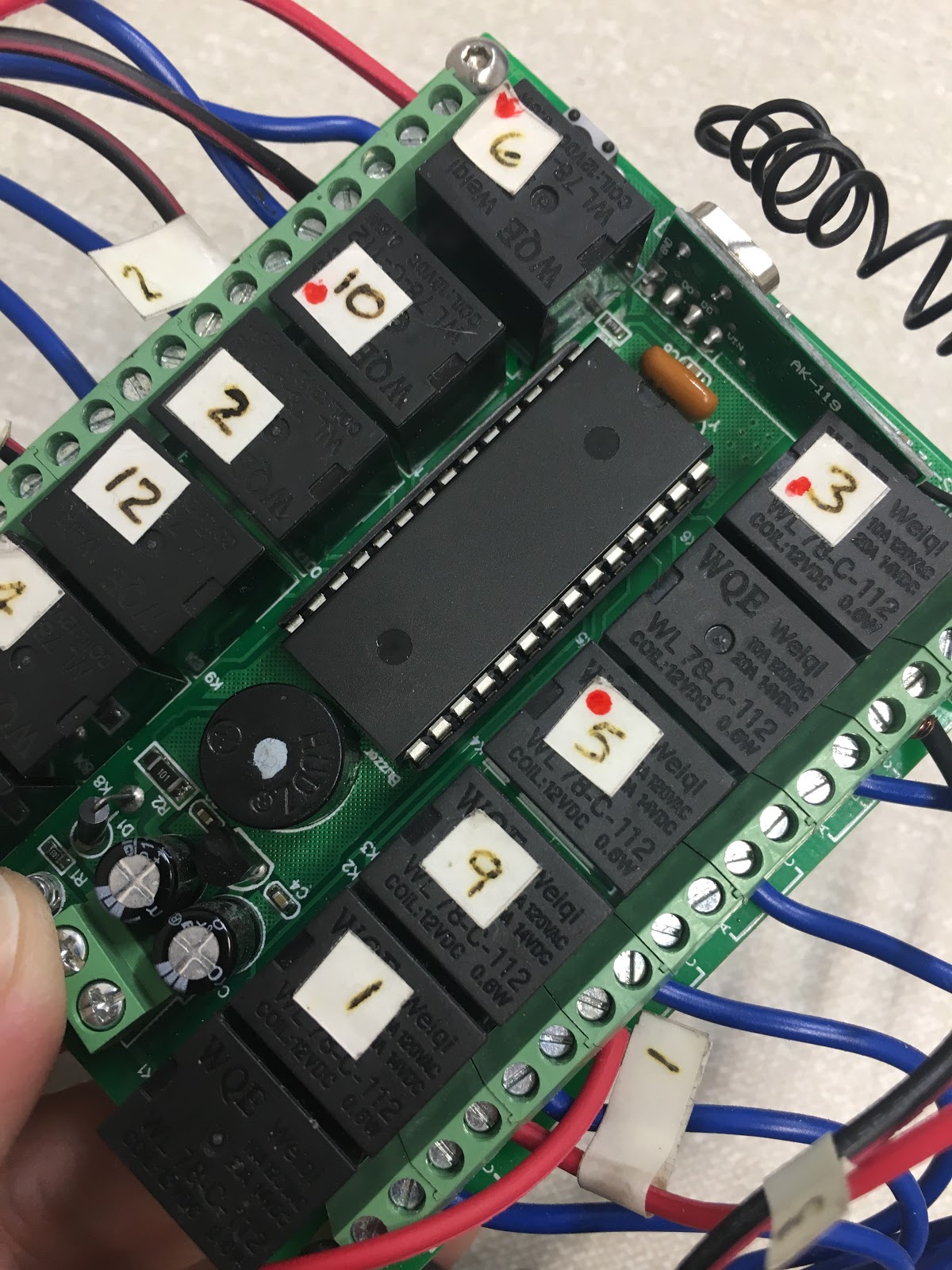
Next up was to mark the relays, with a red dot, that didn't respond to the control.
replacement relay units
De-soldering these joints was fun lol. Quickly heating up the pins to be able to leaver them up out of the holes.
replacement relay units
First relay removed. I was going to go and solder in the new relay, but thought it would just be easier to remove all the 'faulty' relays first. Which is what I did.

Once I had cleaned up the holes, it was then re-soldering in the replacement relays.

And then, once all back in.....the test..............FAILED.....

Relays were carfully soldered back in place. But they still wouldn't switch when remote was activated. Checked resistance with a multimeter and they are not latching when power goes through them, but give a reading when power is not.

Looking like I should cut my losses and buy a new 12 channel unit.

April 25, 2019

12 Channel remote - upgrade.....possibly???

I was never happy with the two 12 channel remotes that I have had. Both have not fully worked properly regarding their relay connections.

I'm not an electronics person, only knowing the basics, so am not able to 'fix' components.

I found and ordered what I thought would be a better working 12 channel controller.

Compared to the original board.

But the new board I'm having connect up issues. I'm not 'technical' with electronics, though I can follow instructions, if there WHERE comprehensible instructions supplied 😒.......more soon, hopefully.

June 11, 2018

R5's sound system - maintenance work

I was never happy with the 12 Channel remote controller as it's relays were ALL over the place, not as you'd expect, fitted to the board 1, 2, 3, 4, 5 etc. Plus the fact that some of the relays don't even work!!

Sometimes some of the sounds don't play either, even tho they do when on the test bench.

One sound that didn't work was the Bad Motivator 'pop-bang' effect. This I noticed when at MCM London the other week.

So I pulled out the board and give it an inspection/maintenance once over. This is where I found one of the wires had actually broken.....The Motivator 'pop-bang' sound effect.

With the actual motivator only recently re-fitted, I didn't realise it was down to this break.

So a quick re-wire and all's now working again.

Future Upgrade: I keep looking at replacing the large board with a smaller 'digital' version of the 12 Channel unit. It has no relays, just a chip!
Digital chip version

12 channel 's still
Mentioned this to Simon B recently at MCM London, as he also had problems with the relay version. This 'chip' version is on my list of upgrades to try out!

October 23, 2015

Sounds .....like...?

19.10.15
Another half hour playing with the sound board and 12 Channel remote.
Few more 'random' settings for sounds and a clip of the Star Wars theme.

Just now need to re-label the remote and back in business, one less thing to do to be ready for Chippenham Sci-Fi Day on the 24th.....

22.10.15
So last night I eventually finished installing servo no2 for the lower utility arm & was going through everything and checking the sounds.....

.......and no SW theme played? :(

Will have to see what happens tomorrow, and then look at it next week.

October 09, 2015

You know that new 12 channel remote I said I wouldn't be needing.....

........well, Wednesday night when I was having problems with R5's motivator actuator not popping up [see next Blog update]. Well I somehow managed to kill the 12 channel remote board :(. It beeps to receive the remote's signal, but nothing else works.....

So out came the replacement one and wired it up. But things are never that simple. The relays are not in order and two don't work at all??
R5D4

But I've multiple sounds via the other button's so not the end of the world.

I then labelled up the remote, so I know what sound is which. Thought it might come in handy if he's talking to kids :)
R5D4

Roll on Saturday :)

October 07, 2015

Electronics & Automation upgrade time..... 1.1

Servo's &  brackets & leads arrived at the weekend.

The servo's I'd ordered were cheap budget Tower Pro ones. Only because I wanted to test that I could get the transmitter to work them. I'd also bout some brackets to be able to fit them. These didn't fit over the servo's location lugs, so I had to file them down a bit to fit. No big problem and they now fit a lot better.

So got to playing with the Transmitter settings in the hope I can actually control the Utility arm's once connected up. See next update on Utility Arm movement Blog post.....

Result!

Thought I'd have to have both arms servo's running off a Y-splitter, but I must of set both 'switches' A & B the same, and the knobs too. This means I can dial the servo's to OPEN position, and then flip the switch and the action is cancelled and the arms will 'CLOSE'..... well, that's the thinking, tho may need to swap this round.

LED's & Fibre optic cable came too. More on this later on......

On order was a new 12 Channel remote control, for sound activation........hope this one works properly!

.......well, this came a LOT sooner than I expected, minus a mini battery [no big deal].... But it arrived the day after I actually got my old one working properly!?!?!

Thought I'd try to sort old 12 Channel remote, one last time. Noticed that the remote's LED was dimming, so swapped it over....... All the channels relays 'switch', they all work and they all play their connected sounds.....What the.....?!?!? Am not 100% sure that this was the cause of the problem, but can't believe that this could of been the whole problem?
But I don't really care, am to happy that it all works lol, even the 'NEXT' function settings work, so I have multipule sounds from clicking one button!

Wired up one of the leads from the slip ring to activate R5's bad motivator sound from the second remote, but couldn't get it to work. Not going to worry to much as it will just have to be operated from the main remote control and be a two finger button pressing operation lol

September 23, 2015

Electronics & Automation upgrade time..... 1.0

As I was not happy with the limited sounds available, due to the 12 channel remote unit not working properly, I've now got round to it & ordered a new one, should be here next month lol.

I've also ordered some servo's to see about getting his utility arms moving. Also ordered a y-lead splitter in case I need it.

April 23, 2015

R5D4 - prep'ed ready for transportation

Spent two hours re-installing all of R5's electrical boards, sound system board and then testing it all.

This was the first time he was all together, dome on, lights on, sound on!
R5D4, R5-D4, r5d4, r5-d4

The sound system was loud! Which is a good thing as you forget that when testing in your garage or at home, (though not at half past 12 at night! lol). You normally DON'T have any loud background noise. But at event's, this increases dramatically. So to be on the safe side, I tested the amp on full power by flipping the two dip switches.......now THAT's LOUD!!! :D
R5-D4

April 22, 2015

Sound problems - 12 channel remote....

Where to start......

......this Build Blog is about the up's and down's, and here's a down post.....

Well, I'd missed crimping an earth connection lead in the eyelet socket, so that explained why one channel didn't play. So redid the wiring into a new eyelet, only to find it wasn't the right size hole (a rouge size). So had to re-do .........again, third time lucky?
12 channel remote
Before I found the missing earth crimp.
Then, all this time testing for sound and not getting anywhere fast, only to find that the remote channel I thought was no1, was in fact no7, (these come with no instructions mind). Am still having issues with actually setting up the remote, as one minute it works (you can hear the relays click) and plays when buttons are pressed, the next some don't??

Another 3 hrs of waisted effort last night, out of the 12 channels, I have 4 channels that will play sound, because the relays or the remote/board programme? And 2 channels that are for some reason repeats of two of the 4 channels?? And there not even connected up???

Conclusion:

  • Either the 12 channel board is faulty.
  • My soldering defo needs improving [this goes without saying lol]
  • There's a problem with the Audio FX board [not likely as test triggers all the sounds]

April 16, 2015

Sound board - installation complete 1.1

Made up some wood location stands, cut slot's into them and screwed them to some MDF base plates. These were then screwed into place.

I then made up a cardboard template of the metal bracket I wanted to make to secure the top of the board. Cut, drilled and then bent into shape, marked position on board and drilled a clearance hole for a bolt, washers, spring washer and a butterfly nut, to secure in place.

I then finished off some more wire's, soldering and connected these back up to there respective terminal blocks.
R5-D4,

R5-D4

R5-D4 sound system
The top securing bracket can be seen better in this image.
This lot took over an hour to complete!

April 15, 2015

Sound board - installation begins 1.0

Here's where the sound board will go once fitted inside R5.
Right at the front. I was originally planning on having the panel attached to the side support wall where the legs attach to, but this would of limited accessing the batteries for removal. Plus here the speakers fire right at the Centre Vents, result!
R5D4

The speakers position couldn't of been in a more perfect position if I had planned it lol
R5D4

I need to make up some mounting brackets to slot the board into at the base and then brackets at the top to the frame up-rights.
R5D4

April 13, 2015

R5-D4's Sound system installation - UPDATE

I've cut down the perspex sheet to a more manageable size, though it's still to be test fitted inside R5's body. Cleaned up the cut edges with belt sander, nice and smooth.


Next was to fit the digital volt meters. I wanted to save space, so I milled holes into a 'stand off' piece of perspex and fitted it above/next to the voltage regulators.

R5-D4 sound system


The wires I had previously prepared......had the heat shrink & sleeve's removed. As it was to restrictive on the bends. I was also not happy with my attempt on the 'negative' wires for the 12 channel remote, so this was redone (in blue wire). I then fitted a single earth connection bolt with eyelets.


I then drilled location holes in the perspex speaker board. This will be mounted, stand off style onto the rear of the sound board. The ground loop isolator unit is also fixed to the lower half section of it.

R5-D4 sound system
Fan's spinning, digital volt meters reading
R5-D4 sound systemR5-D4 sound system

Plugged my 12v adaptor in and powered up sound board. All lite up!! Though at first I was worried the light on the 12 channel unit wasn't working......looking closer I realised it wasn't an led but a diod lol, I then pressed the bind button and it buzzed!

Next is to load up the audio and program the remote
.

March 29, 2015

R5-D4's Sound system - Audio FX & 12 Channel remote.

AUDIO FX SOUND BOARD
With all the soldering going on, I didn't like the look of the work I had done on the Audio FX sound board. So as it came with pin's, I ordered some female crimp connectors off eBay to crimp & solder the wires to these. These were then covered in heat shrink.

At last my 12 channel remote control unit came :)
12 Channal Remote unit for R5-D4's sound system
AA battery for scale.

I also could now layout everything onto the perspex to position and mark for holes to be drilled.

Board mock-up.
R5D4 sound
Audio FX top left, 12 channel remote, top right, voltage regulators (x2) middle, Sure Amp (in bag) bottom. Just the start of figuring out where to put it all.

February 16, 2015

Dome electrics.......upgrade plans......W.I.P.

With plans for electrical extras inside R5's dome, I've had to think about how to power them and control them, what with possibly three different voltages!

I like this challange as its something new to do on R5. It has to be affordable (cheap) and simple for my head to comprehend lol.

I'm thinking of using reciever controlled switch to operate the Bad Motivator 'pop-up' and smoke system, but theres also the 12 channel remote switch unit?? A slip-ring unit will also be needed as the power units are to be in the body (as at the moment, R5's eyes and Motivator LED are battery powered and inside his head).

More updates coming........